Show Mobile Navigation

Popular Posts

Special Discount

Giveaway : Complete Wordpress Package Worth 447$

Haryana Marble House - 02:14
Hello Today i Am Going To Run Worthy Giveaway Worth 447$.This Giveaway Help You Alot To Fix a Premium Blog on Wordpress.This Giveaway includes all premium Things Nothing item is Available Free on internet.We Are Running This Giveaway Not Like A Fool But Their Are Some Major Reasons For This Worthy Giveaway.


The Whole WordPress Package includes These Things:


1) Eleven 40 Pro WordPress Theme + Genesis Framework

{ Worth 99$ }

2) SEO Pressor Premium SEO plugin :

{ Worth 97$ }

3) Gravity Form Premium Plugin

{ Worth 199$ }

4) Layer Slider V.5.4 Premium Plugin

{ Worth 15$ }

5) Easy Wp SEO Premium Plugin

{ Worth 37$ }


              Total Giveaway Worth : 447$ 


 Eleven 40 Pro Wordpress Theme + Genesis Frame Work { Worth 99$ }


The first thing you notice about Eleven 40 is that it’s wide. You don’t have a lot of empty space alongside your column in the theme!
 It’s a very important part of design. (As its name implies, white space is the area of background around your images, text or other website items that separates one thing from another. Check Demo Here 

  • 4 COLOR STYLES
  • 6 LAYOUT OPTIONS
  • FEATURED IMAGES
  • FOOTER WIDGETS
  • HTML5 MARKUP
  • MOBILE RESPONSIVE
  • THREADED COMMENTS


SEO Pressor Premium Plugin :Worth 97$

1) Analysing Keywords Upto Three Times

2) Premium Seo Plugin For Free

3) Checking Keyword Density

4) Checking Of Higher Scores PAges OR Posts

5) Easily Get Your Post In First Three Google Search Results
More Here....
seopressor logo    monthly plan

Gravity Form Premium Plugin : Worth 199$.


Gravity Forms is quite easy to use. It allows you to create multiple forms, both simple ones and extremely long and complex ones. Whether you need to just get some address details or actually want people to submit posts, it’s all possible with Gravity forms.

Easy WP SEO PLugin : Worth 37$

easy wp seo Image Credit : Easywpseo
Check The Details About This Plugin Here

Layer Slider V.5.4 Premium Plugin : Worth 15$


  • Touch Control for Mobile Devices
  • Built in API 
  • Modify the skin from the wordPress admin 
  • Translate a plug in the user interface Admin 
  • Sample slides included
  • Very detailed documentation 
  • Among others WYSIWYG editor that supports drag-and-drop 
  • Free support and future updates of the automatic update feature

Total Giveaway Worth : 447$

How To Enter The Giveaway:

  • Tell Us Something about This Giveaway via comments
  • Like and Follow us on Facebook and Share This Post
  • Do Some Tasks In Below 
  • Rafflecopter Giveaway
  • You Can Win All Thse Things Hust Entering in Giveaway Below By Doing Some Tasks:


a Rafflecopter giveaway


Quick Tip! Share this giveaway everyday on social network to have a higher chance of winning.

How to Use whatsapp Without Bluestacks on PC or Laptop

Haryana Marble House - 02:09

Everyone knows about Whatsapp And 45% of peoples are using whatsapp in world So I'm not interested or even you are also not intersted to Know what is whatsapp.So know come to point of whatsapp on PC without bluestacks.Whatsapp is Mainly recommended for android Phone and it is wuite right use.Few days ago i shared a trick about Use whatsapp on PC with Bluestacks.You can Read it Here.This was also an amazing trick about using whatsapp on pc with bluestacks.But Now the logic is to use whatsapp on PC without Bluestacks.You can use Whatsapp on PC By my this trick.Don't worry i will explain my trick in detail and Via step by Step method.Read my Trick silently and with interest to get benifit of whatsapp on Pc.So let's i explain you the all Whitehat Trick:

Step By Step Guide:


  • Firstly Locate To This Website : ManyMo
  • Click on Sign up Button
  • Register Your Free Account
  • Now they will Send a email confirmation Link on your Email Follow the link And Step Towards.
  • Now You Have To Login to Your ManyMo A/c
  • After Log in You Will Get Your Screen Like Below Screenshot

  • Click on Any Size of Emulator No any unrecommended size.
  • Now a new tab will opens and There a Android Phone at Your Front

  • Download Whatsapp In That Android Phone ( Speed will Be Boosting Bcoz you are using Remote connection Android Phone)
  • Enjoy Free Whatsapp on PC.

Limitation For this Tutorial

  • All conversations will be trashed after closing the browser.
  • Shared Images and files will not be saved on PC until you attach them using online sources like Gmail or Dropbox
  • Not possible to import photos or files from PC except using any online source as medium.
  • Mandatory to verify mobile number for every use.
  • Limited Launches for Free user

So enjoy Your Whatsapp On PC.This is Best MEthod To USe Whatsapp on Pc Without Bluestacks.
Read More: Use whatsapp on PC with Bluestacks

How To increase RAM using A Pendrive In Win 7 , XP and Win 8

Haryana Marble House - 02:04
RAM is also Known to Random Access Memory of Computer.It handles the performance of whole computer.More is the RAM more Suitable or Without hanging Your PC will work.According To experts if you have less RAM then your PC will 'Not respond 'Too Much.To solve this problem you need more RAM but peoples don/t want to invest money Because it cost 2Gb RAM in 20$-25$ something.To solve this problem i am here with you having a trick named How To increase RAM using A Pendrive In Win 7 , XP and Win 8

Steps To Use Pen Drive as RAM of PC or Laptop:

1) Insert Pen drive in Pc or a Laptop


2) Open 'My Computer'.


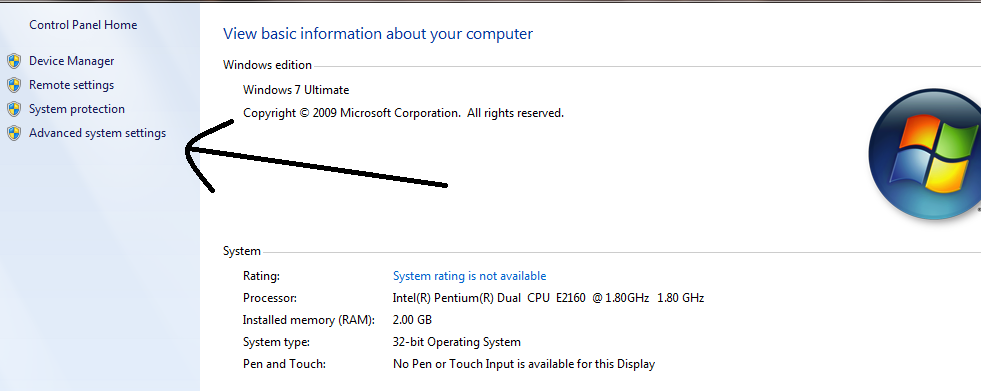
3) Right Click Anywhere in Blank Space and Click on Properties

4) Then Click on Advance System Properties


5) Then in Opened Popup Click on Advanced Tab and Click on Settings


6) Again New Window will opens then click on Advanced

7) In This Window Click on[Virtual Memory] Change Button


8) After Clicking Virtual Memory Settings Will Appear


9) Now Unchecked The Box 'Automatically manaze page size'

10)  Then in Custom size Add Your Pen Drive current same in below format
Add Value of Pendrives as Follows:4GB = 3700mb2GB= 1850mb8gb= 7000mb
11) Now add The Same Value in Both Boxes

12) Restart Your PC 
13) Your PEN Drive is working as RAM ( Physical Memory) of Computer.

Important Instruction:

if You Again Want To MAke Your Pen Drive as a Removable Device Then Simply Follow Above Step And Again Check The Box As Shown in Image Below:


Now You Have To Enjoy Your Increased Ram and Leave a Comment with Your Reviews.And Share this Post on Social Network Sites. 

How To Download Facebook Videos Using Simle Trick

Haryana Marble House - 02:01
Sharing Your Thoughts and Your Photos , Videos and For a Social Networking Facebook is Top Site in The World.Peoples Shares Their Videos For Public.But There is Problem in Facebook That there is ano any download option For Video.
To Solve This Problem I Here shared a trick about Download Videos From Facebook
You can read This Simple Trick and Download Amazing videos From Facebook.

Step By Step Guide To Download Facebook Videos:

1) Open Your Facebook Account
2) Open Video Which You Want To Download
3) Now Copy the Video Link As Shown in Image Below

4) Open This Amazing Site Downvids

5) Paste Video Link in Box

6) OpenDropdown Box if You Want High Quality Video

Enjoy Your Video!!!
You can Download Youtube Videos Also From This Website
If there any Problem Feel Free To Comment.Don't Forgot To Share My Words.Subscribe To Us From Below:

How To Covert Your Facebook Profile into Fanpage

Haryana Marble House - 01:26
Facebook is Best place for Social network.There We can Meet Many new Peoples and Talk to our Friends.Here You can Also Make new fans.
If you want to make more fans on your facebook page you have to read my this tricks about converting a Facebook profile into  a Fanpage.

Features of  The Article

  • Converting Facebook Profile into a fanpage
  • Increase Likes on Facebook
  • Make friends and convert it Into Likes
  • Convert Profile Followers into Page Likes

What's Happen when You Use My Trick

We know that every person have a dream of for lot of likes on their facebook page But How you can Possible this? Yes , You can possible this if you have profile on Facebook.
You need a Facebook Profile.If you have many Followers and Friends on Facebook Then You can Easily make A Fanpage with Lot of Fans.
Examle : if You have 5000 Friends on Facebook and 25000 Followers on Your Profile When You Convert Your Profile to Page it has 30,000+ Likes.
So Why Are you Waiting Read The Trick.

Some instruction About This Trick

i Want to Tell You some Things Which You Will Lost by using My trick.
1) You Will Lost Your All Statuses and Photos
2) Lost al Your Shared Viseos on Facebook
3) Lost All Your Data or Profile Information
4) Lost All Your Apps or Games.
5) Not be able to Add Friends Because it changed to Fanpage
6) Lost all Your Joined Groups
Also Read all Instructions From Here

Step By Step Guide For This Trick

  • Log in To your Facebook Account Which You Want To Convert
  • Now Change Profile Name If You Want Before Migrate
  • When You Did This Go to Help Centre For Instructions.


  • Now Select Your Page Category To For Your New Page

  • Further To Next Step And You Have Successfully Converted To Page
Then You Will Recieve A Message Like This:


After Completing My whole Process Now You Can Enjoy Your Facebook Fans.Start Posting Article To make New Fans.I know Now You Want Read How To Verify Your Facebook Fanpage Read my below article
How to verify Your Facebook Fanpage

 F.A.Q

Is This Step Reversible:

No , This Step is Not Reversible And You can not Make it Profile again

Can i get My All Statuses Back

No , This is Not Possible To Get Your Statuses and Photos Back.Gold Method to Publish Them Again

How To Verify My This Converted Page

You can read my this article May this Help You

Don't Forgot To Share.If you have any PRoblem You Can Comment Here Freely.

How to Add All Your Friends in Group in Just Single Click

Haryana Marble House - 00:22
Facebook are only and only thing To discussion Between many Peoples But Now a days peoples are using Facebook pages for promoting their Facebook Pages or Websites.So They want that their Should be lot of members in their groups but Due to Some painful steps like adding friends one by one is not easy to add Many members in Facebook Group.To solve this problem i just had made Google Chrome Extension Named add all friends in Facebook group in single click.You Can use this this extension too.I made this only for public use.You Can use this step by step According to your need.Don't Worry i here mentioned all Steps and Extension Download link For Your Convince.
Here is trick about adding all facebook friends.Read my trick seriously and do your best.Here is step by step Guide For The Trick.

Read More : Trick To Verify You Facebook Fanpage

Step By Step Guide For This Trick

1) Open Your Google Chrome Browser

2) Add This Chrome Extension To Your Browser.


3) Now install the Given Extension in Your Browser
4) After a install , Open Your Facebook Account and Locate to Your Group Where You Want To add Members
5) Click on The Extension Apears on Right Side of Your Browser


Now LEt's its adding all Your friends to Your Facebook Group


Note: This is only For open Groups
If any problem regarding my trick You can Comment Here Freely .Don't Forgot To Share My Post.

Invite all Facebook Friends in Just Single Click

Haryana Marble House - 01:33
Today here i am sharing a Trick about invite all facebook frinds in single click to like your fanpage. So its not a tough job just follow the few easy instructions and lets get started. Trick is Fully Whitehat and helps you to increase your facebook likes.Don't Worry we never spam.Use my solid trick to beat your competitor and gain fame from public.if You Liked my Trick than Don't Forgot To Share and Comment.You can use my trick freely.Many people asked me that it is not possible to invite all facebook friends in single click to solve the problem i had shared a great trick about invite all friends to Facebook page in single click .Yes using easy JavaScript trick we can invite all our friends at once and they can be added easily.

Step By Step Teaching of Trick:

1) Log in To Your Facebook A/c
2) Open Facebook Page Where You Want  To Invite Friends
3) Press CTRL + SHIFT + k ( If Using Chrome).OR Press CTRL + SHIFT + J ( if Using Mozilla Firefox )
4) Click on Console Tab

6) Now open and copy the script
Open Script
7) Paste the script in console box in facebook Which had already opened.
8) Press enter and wait.
9) You Are done enjoy likes.

From Editors Desk:

I Given you My Whole script made by me and my team.If any problem in inviting friends you can comment below freely.


Hex Colour Code Generator Tool

Haryana Marble House - 22:04


Every Blogger Wants Thats His Blog looks very attractive.Mainly one thing every person notice is the colour of blog.Bloggers also wants to change color but they not about hex color.To solve their problems i have made tool for getting code of any color via my colour code generator hex tool.You can you this tool anytime because my tricks for public use.So why are you waiting use my tool and generate your codes.


Covert Codes into Colours.


Convert HTML and Javascript Into Plain Text

Haryana Marble House - 21:44
Today i Made my first blog tool , i made this tool For Public Use to convert HTML or JAVA to Plain Text.Many Sites or Blogs do not except direct sharing of html in their comments.And it is also seen that it is not easy to embed google adsense code to blogger blog without converting it.So To solve this big problem Here i made my great tool that will help You Convert Your Codes.

Steps To Convert Code:

1) Paste Your Code in Box.

2) See if Your Code is Right

3) Now Press Convert Button

4) Copy Your Converted Code


Ultimate and Best PPC (pay per click website) websites online

Haryana Marble House - 00:17
Today i am sharing a great and a much important secret to Make money with PPC (Pay Per Click Websites) sites.All Bloggers want To Make Money With Blogging or any Advertising Programme online.Pay Per Click Advertising Program  is one of the best Method To make money with blogging.This method is very famous in blogging cretirea and everyone is adopting this to make some chunks.PPC Sites are offering bloggers to make money money.A Simple wording Description of PPC Websites is pay per click ads.Apart Fom This there are many methods to make money with blogging Like :- Sponsor reviews , Paid post , Advertising on daily basic and many more.Come to main point about making money with PPC Website.I am here with you show you some Best Pay per click websites.


According To my this article you will be able to make huge chunks via PPC Websites

 List of Best Pay Per Click Websites  

  • Google Adsense
  • Media.net
  • Chitika Ads
  • Infolink in Link Advertising

Some Description About These Pay Per Click Websites

Google Adsense

Google Adsense is one of the popular site in the world criteria of PPC Websites.Every Blogger Wants To make Money From Google Adsense Pay per click Programme.Its best advantage is that it has highest CPC Rates.Its CPC rate is vary between 0.2$ To 105$.That is Huge in World.So Every Blogger Has Dream To Make Money Google Adsense .My first advice is to choose adsense for making money with Pay Per Click Websites.But Some of Peoples Says its Approval is Not Easy But There i Shared a Tutorial About How To Get Adsense Approval Easily.
1) Approval is Easy With Trick
2) Highest CPC Rate upto 105$
3) Owned By Google inc. ( Fame)
4) Easy To Got Money With EFT Transfer
5) Payout is minimum 100$ ( Easy To Make Those)
Must Read: How To Enable Google Adsense EFT Transfer For Fast Payments

Media.net


This Pay per Click Website is owned by Yahoo and Bing Contextual Ad Program. This.This is One of The Competitor To Google Adsense ( Lol :-p ).But Now A Days it is Very Popular To Make Money With Blogging.Many of Peoples Are Avoiding Google Adsense Due To limitation of Getting Banned.So This is Also A Best and one of The Pay Per Click Websites.
  • Approval is Easy If Alexa is >200k
  • Owned By Yahoo and Bing.
  • Minimum Payout is 250$ Via Wire Transfer


This is Another Pay Per Click Website Where You Can Make Lot of Money  by putting ads on your blog.This is Program Owned by Some Advertising Sites.This Accepts traffic only from search engines like google.Their CPC rate is Too Low Just Like a penny.So Currently this is Not So Popular in blogging world But this is also a Google adsense alternative where you can make money.This is also one of the Pay par click Websites.
  • No any approval program.
  • You can use media.net both on same blog
  • Requires traffic via search engines
  • CPC Rate is Too low

Infolinks

This Sites currently very Popular in Blogging world .many of bloggers are making alot of money with this in text ads site.This is also a Pay Per Click Website.There Approval is Too Easy.They Want Traffic From Anywhere.This is also an adsense alternative.Its CPC rate is Good But Not best.You Can use it on lower traffic blog also but no any benefits due to lack of Clicks and Traffic.This is most popular Pay Per Click Website.
  • 1) Getting Approval is Too Easy.
  • 2) Even a Good CPC Rate not Best
Must Read :Make Money With Event Based Niche Blogs


From Editors Desk:

Pay per Click Websites are Best way to make money in blogging.According To me Google adsense infolinks are best for every blog if their blog contains traffic From United States.So Happy earning With PPC Sites.
best ppc websites 
pay per click ads 
best pay per click advertising programs
ppc sites
how does pay per click work on google
ppc marketing

How Google Adsense EFT or Wire Transfer of Money is Benificial To Bloggers

Haryana Marble House - 01:07
Hello Friends , Firstly Congratulations To All Indian Bloggers For Google Adsense Wire Transfer.This Awesome Step Taken By Google Adsense Is Really Helping Indian Bloggers .To Receive Their Chunks Fastly. Now.Now If You Not Known About This Step Taken By Google Adsense Then i Will Teach You Whole Process In This Article.You Can Read in This Article:

  • What is EFT or Wire Transfer
  • How To Enable EFT Transfer on Your Adsense A/c
  • How Much Time it Take To Transfer Moey
  • Reviews of Pro Bloggers About EFT Transfer of Google Adsense

What is Google Adsense EFT Transfer

Firstly i wanna Tell You Something About Google Adsense EFT Transfer.Google EFT Transfer is Step Taken By Adsense is For Help Indian Bloggers For Receiving Their Money Accurately.In Simple Words Google Adsense EFT Transfer is Bank Transfer or Wire Transfer of Money.It Can Be Done Bank A/c {Not Paypal}.By Reading These Simple Words i Know You Are Known About it.You Know Have To Read My Whole Article To Know About Whole Process.

How To Enable EFT on Your Adsense A/c

In This Step i will Teach You All Steps To Enable Wire Transfer To Your Adsense A/c.So Read This Article Seriously To Enjoy Money Directly To Bank A/c

Requirements:

  • Google Adsense A/c
  • Some Cash In Your Adsense A/c
  • Bank A/c
  • SWIFT Code
  • IFSC Code
  • Bank A/c No.
Step By Step Teaching of This Trick :
 1) open Your Google Adsense A/c


 2) Select Payment Option From Gear icon on Top Right corner in Your Adsense A/c.

3) Click on Payment Settings Tab From Left Sidebar Menu

4) Now You are Seeing a Self Hold Option At The end of Page Click on it.

5) Now You Will Seen a Checker Box.Now You Have To Check The Box And Save It.

How Much Time it Take:

6) This Process Will Take More Than 2 Days.
7) After Few Days You Will Seen Option "Your account has been upgraded to a new payments system" in Your Adsense Account Like Below Screenshot.

8) Now Click on View Payments Link As Shown in Screenshot.
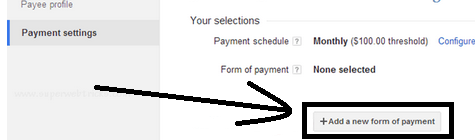
9) Go To Payments settings tab and Just Open Add New Form of Payment Link.


10) Now This is Lst Step Where You Have To Provide Your These Bank A/c Details:


1) Account Holder Name: Now You Have To Give Name of Account Holder As Shown in Your Bank Passbook.Read it And Write it in The Form Accurately.

2) Bank name: Provide The Full Bank Name Where Your Money Will Be Credited.

3) IFSC: The Indian Financial System Code (IFSC) is an  code which Helps To identify the r branch of any bank. You may find your bank branch IFSC code in the Passbook or Cheque provided by your bank.

4) SWIFT Code: Bank Identifier Code (BIC) is widely known as SWIFT code which is a unique identification code for a particular bank. s.

The SWIFT Contains  8 or 11 characters. The first Four Characters are of Your country code. There after next 2 characters are location or Local code and Next  3 characters are for branch code.

For example: SBI - SBININBB106, ICICI -   ICICINBB006 and HDFC - HDFCINBBCAL And MAny More According To Your Location.

5) Bank Account Number: In This Step , You Have to
 provide your  bank account number Where You Wish That your dollars will be credited.

Reviews of Pro A Blogger About Google Adsense EFT Transfer :


It's great...I am using this facility right from the day when google introduced this facility...it take 4 days To Transfer Money in My Bank A/c

From Editors Desk:

i Know You Are Very HAppy To See This Action Taken By Google Adsense.I wrote My whole article in full detail.If You have since any problem then you can comment freely.Please Help us to Spread my Words by sharing it on Social Sites 


Review and Download : X The Popular and Unique Wordpress Theme - Themeforest

Haryana Marble House - 08:39
Download  X The Popular and Unique Wordpress Theme - Themeforest.This is now Most Most Popular in the world running on 10000+ Blogs in the world.This theme has Extra amazing And Unique Features.You Can Download It By Reading Below.

Theme Features:


  • X  wordpress theme has a responsive design
  • It looks amazing on high resolution devices like iPhone, iPad, android phones etc.
  • The theme is packed with a premium page builder
  • The theme is fully SEO optimized
  • You can Also open a Store Via This Theme - E-commerce
  • The Theme Social Responsive
  • You can Add Sidebars as much You Can
  • Theme Has Many Features Allows You To Edit Post


How To Approve Adsense Account Easily For New Blog or Website

Haryana Marble House - 00:04

Whitehat Trick To Approve Adsense A/c Easily | Approve Adsense A/c Easily


Google Adsense is One of the top earning source for bloggers.But Google Not Easily gave them a  Unhosted Adsense A/c Today i am sharing a Trick about Approving a Google Adsense Unhosted or original A/c in 
Easily For New Blog.Few Days Ago My This Trick Was Premium But Now This Trick is Live To You.You You Can Easily Approve Adsense Account By Using My Little Trick,But You Have To Read My Trick Seriously Then You also Have Your Adsense A/c.
I Will Teach You All Steps One By One.Don't Forget To Share my Post.
Step By Step Guide To Easily Approve Adsense Account

Write Posts in Your Blog

  • Write 7 Posts

  • Fully SEO optimized

  • Don't Copy These Posts From Anywhere

  • Highlight Your Keywords in Post

  • Put Meta Tags For Each Post

  • Now This Step is Complete


Make important Pages On Your Blog or Website:-


  • Sitemap
Some Tips For Approve Adsense Account Easily:

1) Don't Use More Than one Account on Same IP
2) Don't Post About Hacking Tips
3) Make Some Links To Your Blog.
4) Using These Simple Trick Your Google Adsense Account Will Be Approve Easily.

From Editor's Desk:
Many Peoples are working for selling adsense account are using this trick.You Can Also get One From This Trick.I Also Got Two Accounts By Using This Whitehat Trick.


Step By Step Guide To Make Money With Event Based Niche Blog ( Raksha Bandhan)

Haryana Marble House - 20:14
Firstly i Say Hello To All , Now i am with you to share a great secret to make chunks of money with Event Based Niche Blogs.You Are already well known about blogging and make money with blogging.

According to me , You also Heard about Niche Blogs.But in Today Time there is Quite popular way to earn money with Event based niche blogs.This Type of Blogs are made by many of expert Bloggers Like :- Imran Uddin ( All Tech Media) and many more.

An Introduction With Event Based Niche Blog

I Would like to introduce you about Event Based blog.Its Really Clear in The name Blogs Which Are Based on any upcoming Event or festival , Results Etc. are Event Based Niche Blogs.
For Example:-
Now Rakhshabandhan is nearest Festival For india.I Make a blog and Fill it With Rakhi Wallpapers , Rakhi sms , Rakhshabanhan Full HD Wallpapers 2014.Then Peoples Search For Google To Find Wallpapers To Be Post on Social Sites Like Facebook , Twitter , Etc. Many More.
This all Process Is In Event Based Niche Blog

Step By Step Guide To Make Money With Event Based Niche Blog

1.)Choose A Domain Realted To Year Niche

There is First Step To Choose A Domain Related To Your Niche Or Event.Like if You Plan To Make Blog on Rakshabandhan Festival Then You Can Use Following Domain:-

Rakshabandhanwallpapers2014.com
Freerakshabandhanwallpapers.com

It may help you alot to get your blog on first page of google.Try any domain you want i shown this Because nearest festival is Rakshabandhan.


Post Title and Blog Title

This is really great Tip that you must keep in mind while instructing a Event Based Niche Blog.You Not Need only Domain Related To Your But You Have To Set A Post Title Also According To Your Event Like I Am Here Guiding You For To make Blog on rakhi Festival.

MY Tricks To Get Success:-

  • Your Keyword Must Be According To What People Search
  • Don't Forgot To Do Interlinking Between All Posts.
  • Don't Write Poor content Always Be Rich
Let's Took An Example:
Like on Rakhi Festival Put Your Post Title as
Rakhi Wallpapers for FacebookRakhsha Bandhan Wallpapers Raksha Bandhan Full HD WallpapersEtc. Many More......
 I Hope You Are Now Full Understand About Setting Up a Post Title & NEver Do Such Mistakes Which I Shown Here.Be REady To Make Blog On Rakhi.


Link Building

This is most important SEO fact to Get your Blog on First Page on Google Search.Apply My MEthods To Do Link Building in 20-30 Days.You Need almost 5000+ Links With Your Keywords To Be on First Page of Google And Earn Chunks.
Some ways Of Link Building

Find These Blogs and Start Commenting


  • .EDU Blogs 
  • .GOV Blogs 
  • Anchor text Comment Blogs 
  • Angela's Backlinks 
  • CommentLuv Premium Blogs 
  • DO FOLLOW Comment Blogs 
  • Expression Engine Forums 
  • Hub pages 
  • KeywordLuv Blogs 
  • LiveFyre Blogs
Helpful Tool For Link Building Here
Do Commenting as Much You Can Never BE Spam.I know This is Most Painfull And Time Spending Fact But if You Want Chunks then you have to do so.


SEO

I Know You alredy Known about this word and i also know no one is fully perfect in SEO.But There are many Experts In SEO.This is most Imposrtant Expression to search Engines To Rank Blog in SERP.To Do SEO of Event BAsed Niche Blog You Have To Get Coaching From any Expert Like : Harsh Agrawal , Imran Uddin  or Here

Read More :Plugin To Do Automatic SEO For Blog

Monetization

I Know You Will Make Blog According To Above points and more articles you read on other popular blogs.But now a time to earn money from your blog.There is only and the best way to earn money is Google Adsense.
Let's Show You A Thought From Imran Uddin Who maked 2000+$ From Adsense By Event Based Niche Blog.
So, in total the site has made a profit of over $2000 from (Google Adsense) its whooping traffic. - Imran Uddin
If You Not have any Google Adsense Account Yet.Contact ME To Purchase A Account  

From Editors Desk: 

Some Extra Tips

  • Use Blogger Platform To Make Event Based Niche Blog
  • Start Working 30 days Before From Event
  • Try To start it in a partenership
  • Don't Forget To submit site to webmasters.
  • Sleep At The night of Event and Imagine Money in Dreams.
  • Please Leave a Single Comment and Share it on Social Media.


Next Previous
 

Let's Taste Our Tricks

Subscribe TricsTeaching.com to Get Free Premium Stuff